Pull Pan Dave · Excavation and site work
Employee work texts.
Your choice.
Pull Pan Dave is an excavation and heavy civil site-work company. Our work includes grading, mass earthmoving, and storm drain construction.
Pull Pan Dave Hub sends optional recurring automated SMS work reminders, follow-ups, and mention notifications to employees who choose to receive them. This program is for internal company work only; customers and marketing contacts are not enrolled. No marketing messages are sent.
Open employee opt-in formRequires an approved employee Hub account. Opening the link does not enroll you.
Proof of the actual Hub account opt-in
The signed-in form is private to approved employees. Reviewers can see an actual October 9, 2026 Hub screenshot without signing in:
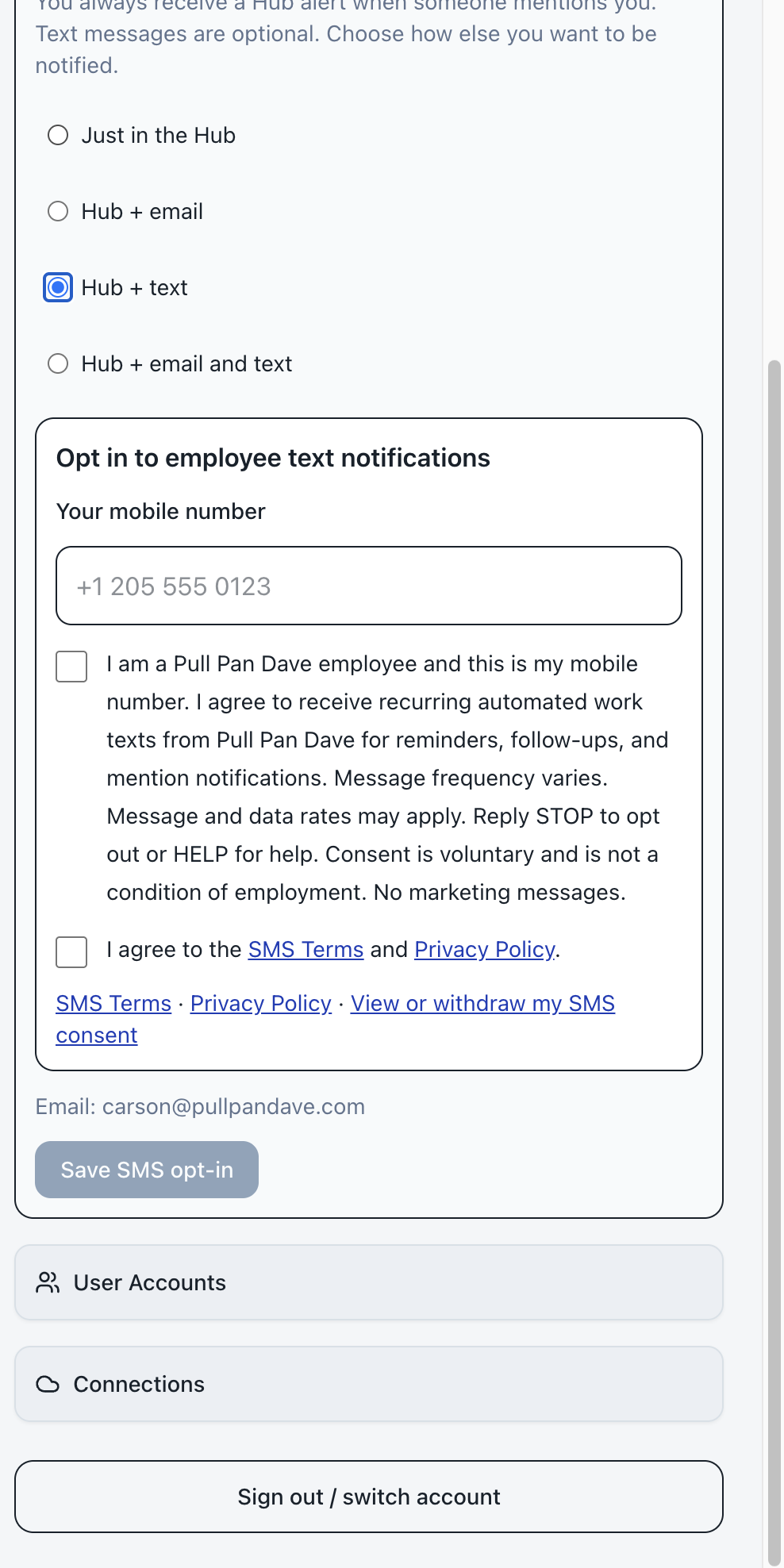
The screenshot shows the mobile-number field, both unchecked consent boxes, disclosures, policy links, and “Save SMS opt-in” button. It is an existing Hub screenshot, not a sample form.
How employees opt in
SMS participation is optional. Employees sign in to their approved account at Pull Pan Dave Hub. The Hub offers two places to record the same SMS consent:
- Account notification settings: Open Notifications, choose “Hub + text” or “Hub + email and text,” enter your own mobile number, check the separate SMS consent and SMS Terms/Privacy Policy boxes, then select “Save SMS opt-in.”
- Employee SMS form: Open Employee text notifications, enter your own mobile number, check the same two separate boxes, then select “Save my SMS consent.”
Both checkboxes start unchecked. Selecting a notification option, entering a phone number, creating an account, or being an employee does not enroll anyone. The employee must actively select both boxes and save. An administrator must then enable delivery to the same consented number.
The Hub records the employee account, mobile number, consent choice, disclosure version, and timestamp. Employees can withdraw consent in the Hub or reply STOP to any message. Reply HELP for help.
Exact consent disclosures
The same wording is used in both Hub enrollment paths.
The controls above are a read-only text reference. Consent is submitted only in the signed-in employee Hub.
After consent is saved
The Hub confirms that consent is saved and explains that an administrator must enable the mobile number before text delivery can start.
Stop texts or get help
Reply STOP to any message to stop SMS delivery. You can also withdraw consent from the employee opt-in form. Reply HELP for help, or contact carson@pullpandave.com. Message frequency varies. Message and data rates may apply.